
The Silent Killer in Go: When Your Slice Data Changes Itself
We love Go slices. They are one of the language's most powerful features, offering dynamic sizing and easy manipulation of arrays. But with great power comes great responsibility—and occasionally, some very confusing bugs.
Recently, I reviewed a piece of code that looked innocent enough. It created a slice, appended some data, created a couple of variations, and printed them out. But the output told a spooky story: a variable's value changed without anyone touching it.
If you've ever spent hours debugging why data in a slice mutated "magically," this article is for you.
The Crime Scene
Let's look at the code in question. It seems straightforward: create a slice, add numbers, make two copies with different endings, and print everything.
package main

import "fmt"

func main() {
	s1 := make([]int, 0, 0)
	fmt.Printf("s1 == cap: %d / len: %d / value: %v \n", cap(s1), len(s1), s1)

	s1 = append(s1, []int{1, 2, 3, 4, 5}...)
	fmt.Printf("s1 == cap: %d / len: %d / value: %v \n", cap(s1), len(s1), s1)

	s2 := append(s1, 6)
	fmt.Printf("s2 == cap: %d / len: %d / value: %v \n", cap(s2), len(s2), s2)

	s3 := append(s1, 7)
	fmt.Printf("s3 == cap: %d / len: %d / value: %v \n", cap(s3), len(s3), s3)

	fmt.Println("\n\nFinal \n---------------")
	fmt.Printf("s1 == cap: %d / len: %d / value: %v \n", cap(s1), len(s1), s1)
	fmt.Printf("s2 == cap: %d / len: %d / value: %v \n", cap(s2), len(s2), s2)
	fmt.Printf("s3 == cap: %d / len: %d / value: %v \n", cap(s3), len(s3), s3)
}
The Mystery
If you run this, the first time s2 is printed, it ends with 6.
s2 == cap: 8 / len: 6 / value: [1 2 3 4 5 6]
But scroll down to the "Final" section. Look at s2 again.
s2 == cap: 8 / len: 6 / value: [1 2 3 4 5 7]
Wait, what? s2 changed from ending in 6 to ending in 7. We never assigned anything to s2 after its creation. We didn't pass it to a function. We didn't use pointers. How did the data corrupt itself?
The Culprit: The Backing Array
To understand this, we have to look under the hood. In Go, a slice is just a header. It contains three things:
A pointer to an array (the backing array).
The length (len).
The capacity (cap).
Here is the golden rule of Go slices: append does not guarantee a new, independent backing array.
Go is optimized for performance. If there is room in the existing backing array, append will reuse it rather than allocating new memory.
Step-by-Step Breakdown
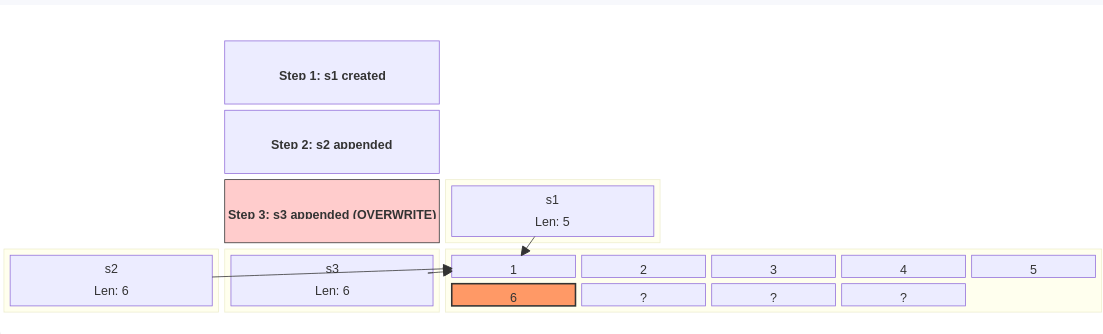
s1 Creation: We start with s1. We append 5 elements (1 to 5). Even though we only asked for 5 slots, Go is smart. It allocates a backing array with extra room (capacity) to avoid reallocating on every single append. Let's say the capacity becomes 8.
Memory: [1, 2, 3, 4, 5, ?, ?, ?]
s1 len: 5 (It only sees the first 5 numbers).
s2 Creation: We run s2 := append(s1, 6).
Go checks s1. Does it have capacity? Yes (8 > 5).
Go reuses the same backing array.
It writes 6 into index 5.
Memory: [1, 2, 3, 4, 5, 6, ?, ?]
s2 len: 6 (It sees up to the 6).
At this moment, printing s2 shows [1, 2, 3, 4, 5, 6].
s3 Creation: We run s3 := append(s1, 7).
Go checks s1 again. Does it have capacity? Yes!
Go reuses the same backing array again.
It writes 7 into index 5. This overwrites the 6 that s2 is looking at.
Memory: [1, 2, 3, 4, 5, 7, ?, ?]
s3 len: 6.
The Final Print:
s1 still has a length of 5. It prints [1, 2, 3, 4, 5]. It doesn't show the corruption because its length hides index 5.
s2 has a length of 6. It looks at the backing array. Index 5 is now 7. So s2 prints [1, 2, 3, 4, 5, 7].
s3 also prints [1, 2, 3, 4, 5, 7].
The Lesson Learned
This is a classic "slice aliasing" bug. It happens because different slices can share the same underlying data.
When you use append, you are trusting Go to manage memory. Usually, that's great. But when you create a new slice from an existing one (like s2 from s1) and then continue to use the original (s1) to create another slice (s3), you risk them stepping on each other's toes.
How to Protect Yourself
As senior engineers, we need to write code that is robust, not just "working for now." Here is how to avoid this trap:
1. Be mindful of capacity If you intend for a slice to be independent, ensure it doesn't share capacity with the source.
2. Explicitly Copy If you need a true standalone copy of a slice, don't rely on append to separate them. Use the copy built-in or create a new slice with specific capacity.
// Safe way to create an independent copy
s2 := make([]int, len(s1), len(s1)) // Cap equals Len, no extra room!
copy(s2, s1)
s2 = append(s2, 6)
By setting the capacity equal to the length, you force the next append to allocate a new array, breaking the link to the original backing array.
3. Limit Slice Exposure When passing slices to functions, be aware that the function can modify the backing array even if you don't return the slice. If mutation is dangerous, pass a copy.
Conclusion
Go makes memory management easier than C, but it doesn't hide it completely. Slices are references to arrays, not the arrays themselves.
The next time you see a variable change value without an assignment, check your slices. Ask yourself: "Am I sharing a backing array?"
Trust, but verify your memory layout. Happy coding!